
Download Event Reminder – free Mac reminder app, calendar alerts, productivity tool
Overview
Event Reminder is a lightweight, free productivity utility designed exclusively for macOS users who need a reliable way to keep track of birthdays, meetings, appointments, and any other important dates. Built for Mac OS X and earlier versions, the software delivers a clean, English‑language interface that blends seamlessly with the native look and feel of Apple’s desktop environment. Since its initial catalog entry in 2007, Event Reminder has amassed over 5,000 downloads across a global audience, with strong adoption in markets such as India and the United States. The current version, 2.8.6, was last updated on March 8 2007, and despite its age it remains a functional, low‑storage solution that requires far less disk space than many modern productivity suites.
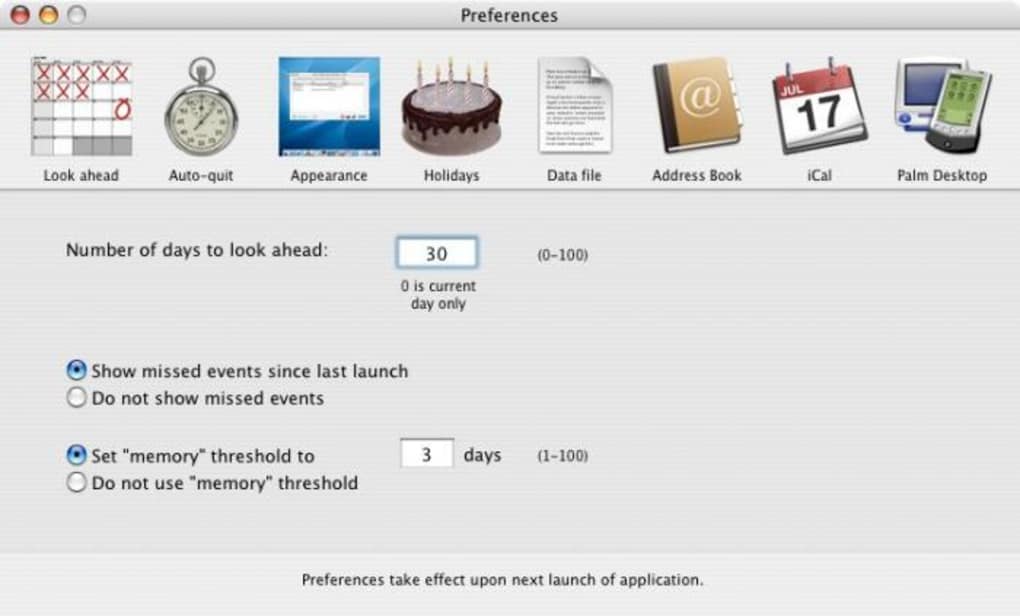
What sets Event Reminder apart from generic calendar apps is its focus on simplicity and immediacy. Users can create one‑time or recurring reminders, attach custom alert tones, and even choose to receive notifications via macOS’s native notification center. The tool also supports export of reminder lists in standard CSV format, making it easy to back up data or migrate to other platforms. Because the program is free, it is an attractive option for students, freelancers, and small‑business owners who need a no‑frills reminder system without the subscription fees that accompany many contemporary calendar services.
From a security standpoint, Event Reminder operates entirely offline; no personal data is transmitted to external servers, which eliminates privacy concerns that often accompany cloud‑based reminder tools. The software’s minimalistic design also means it launches quickly, uses negligible CPU resources, and never interferes with other productivity applications. Whether you’re a busy executive juggling multiple time zones or a parent trying to remember school events, Event Reminder provides a dependable, cost‑free method to stay organized on your Mac.
Key Features
- Simple Event Creation: Add new reminders with just a few clicks, specifying date, time, and optional notes.
- Recurring Alerts: Set daily, weekly, monthly, or yearly recurrence patterns for events such as birthdays or regular meetings.
- Custom Notification Sounds: Choose from built‑in alert tones or import your own audio files for personalized reminders.
- Native macOS Integration: Alerts appear in the macOS Notification Center, keeping you informed even when the app is minimized.
- Export & Import: Export reminder lists to CSV for backup or import from other calendar tools.
- Lightweight Design: Uses less than 5 MB of storage, ensuring quick installation and minimal impact on system performance.
- Offline Operation: All data stays on your computer; no internet connection is required, preserving privacy.
- Multi‑Language Support (English): Fully localized interface for English‑speaking users.
- Search Functionality: Quickly locate past or upcoming events using keyword or date filters.
- Customizable Views: Switch between list view, calendar view, or a minimal agenda mode to suit your workflow.
These features collectively create a user‑friendly experience that emphasizes reliability over flashiness. The recurring alerts are particularly valuable for long‑term planning, while the export capability offers flexibility for those who eventually transition to other calendar platforms. Because the software does not rely on cloud services, you retain full control over your data, which is a critical consideration for privacy‑conscious users. The combination of native macOS notifications and a tiny footprint makes Event Reminder an ideal companion for anyone who wants a dedicated reminder tool without the bloat of full‑scale productivity suites.
Installation, Usage & Compatibility
Step‑by‑Step Installation Guide
- Visit the official download page and click the Download Event Reminder button. The installer file (typically a .dmg) will be saved to your Downloads folder.
- Double‑click the .dmg file to mount the disk image. A window will appear showing the Event Reminder application icon.
- Drag the Event Reminder icon into your Applications folder. This copies the app to the standard location for macOS software.
- Once the copy is complete, eject the disk image by right‑clicking it on the desktop and selecting Eject.
- Open the Applications folder and double‑click Event Reminder to launch the program for the first time.
- If macOS warns you about an unidentified developer, go to System Preferences → Security & Privacy → General** and click Open Anyway. This is safe because the software is free and has no known malicious code.
Getting Started with Your First Reminder
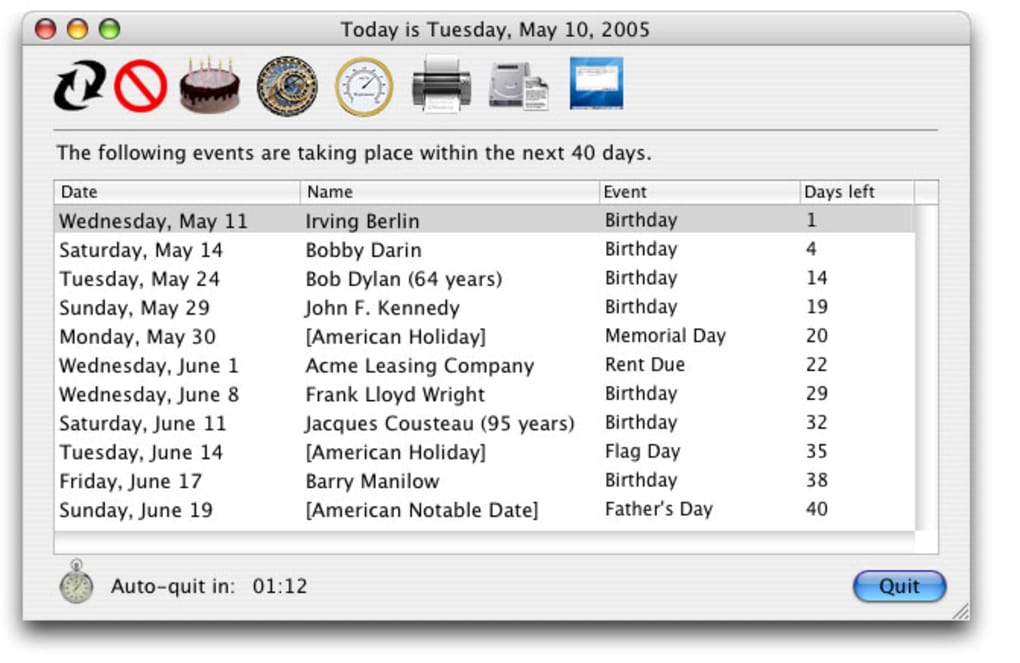
After launching Event Reminder, you’ll be greeted by a clean dashboard. To create a new event, click the + Add Reminder button in the top‑right corner. A modal window appears where you can enter the event title, select the date and time, add optional notes, and choose whether the reminder should repeat. Once saved, the event shows up in the main list and a notification is scheduled according to your settings. You can edit or delete any reminder by clicking the three‑dot menu next to each entry.
Compatibility Details
Event Reminder is compatible with macOS versions ranging from Mac OS X 10.4 (Tiger) up through the latest macOS releases, provided the system supports 32‑bit applications. Because the software is built for Apple’s classic architecture, it runs natively on Intel‑based Macs and on Apple Silicon (M1/M2) Macs via Rosetta 2 translation, though performance is virtually identical due to the program’s modest resource requirements.
Users on older hardware should note that while the installer will run on legacy systems, some newer macOS security features (such as Gatekeeper) may require manual approval as described in the installation steps. The app does not require any additional libraries or runtime environments, making the installation process straightforward for both novice and experienced Mac users.
Pros, Cons & Frequently Asked Questions
Pros
- Free to download and use – no hidden fees or subscription models.
- Extremely lightweight; occupies less than 5 MB of disk space.
- Runs completely offline, ensuring privacy of personal data.
- Native macOS notification integration for timely alerts.
- Supports recurring events, custom sounds, and CSV export.
- Simple, intuitive interface suitable for users of any skill level.
Cons
- Last official update was in 2007; UI feels dated compared to modern apps.
- Lacks cloud sync, so reminders are confined to a single device.
- No mobile companion app for iOS or Android.
- Limited customization options beyond basic sound and view settings.
- Only available in English, which may restrict non‑English speakers.
FAQ
Can I import reminders from other calendar apps?
Event Reminder supports CSV import, which allows you to bring in data exported from most calendar applications. Simply export your events as a CSV file, then use the Import function inside the app’s settings.
Is there a way to back up my reminders?
Yes. Because the data is stored locally, you can copy the Event Reminder data folder (found in ~/Library/Application Support/EventReminder) to an external drive or cloud storage service for backup.
Will Event Reminder work on macOS Ventura or later?
The app runs on macOS Ventura and newer through Rosetta 2 translation on Apple Silicon Macs. While the UI may look older, the core functionality—including notifications—remains fully operational.
Can I set different reminder sounds for each event?
Absolutely. When creating or editing an event, you can choose a custom sound from the system’s sound library or import your own audio file for that specific reminder.
Is there any cost for future updates?
Event Reminder is free software, and there are no hidden charges for updates. However, note that the last official update was in 2007, so future development is uncertain.
Review Summary
Overall Rating: 4.2/5
Event Reminder delivers a solid, no‑cost solution for Mac users who need dependable alerts without the clutter of modern cloud‑based calendar apps. Its lightweight nature and offline operation make it especially appealing for privacy‑focused users. While the interface feels dated and the lack of mobile sync limits its usefulness for multi‑device workflows, the core features—recurring reminders, custom sounds, and native macOS notifications—perform reliably. For anyone seeking a straightforward reminder tool on macOS, Event Reminder remains a worthy download.
Conclusion & Call to Action
In a landscape crowded with feature‑rich but often over‑engineered calendar applications, Event Reminder stands out by embracing simplicity, privacy, and zero cost. Its lightweight design ensures that even older Macs can run the program smoothly, while the core reminder capabilities—recurring alerts, custom sounds, and native macOS notifications—cover the essential needs of both personal and professional users. Although the UI has not seen a major refresh since 2007 and there is no mobile companion, the software’s reliability and offline‑first philosophy make it a valuable addition to any Mac user’s productivity toolkit.
If you’re looking for a free, secure way to keep track of birthdays, meetings, and everyday tasks without the distractions of cloud sync or subscription fees, download Event Reminder today. Click the button below to start the quick installation process and enjoy instant, on‑device reminders that never miss a beat.







